Showing posts with label usefull tricks. Show all posts

Sunday, June 17, 2012

Enable Check Boxes In Windows7 To Select Multiple Files Easily


Check-box-in-win7Selecting multiple files using Ctrl or Shift is very convenient way to do, But what if there is an even more easy way to select multiple files without holding Crtl or shift. So in this post HPH will describe you how to use windows7’s check box feature to select multiple files without holding any key.
Even though this feature is good and new most of the windows7 users may find it real useful, So lets roll the simple steps to enable check boxes.

Steps to be followed:
Step #1: Go to your Start Menu and type Folder Options in the search bar and press enter. Alternatively you can go to Start Menu > Control Panel > Folder Options.
Step #2: Now click View button and scroll down to see “Use check boxes to select items”, just enable it by marking the check box.

Thursday, May 31, 2012

How To Use Peter Answers: Tutorial & Trick Revealed

Peter answers site  www.peteranswers.com


Tutorial: When you enter your petition, do not type "Peter, please answer the following:", instead, press the period button. After that, type in your real answer. Once done, press period and finish off your petition. Then type in the question that relates to your answer that you wrote in your petition!

Hope you enjoyed and please subscribe!

"Do you need to ask a question? Are you looking for answers? Peter offers you a space to ask anything you want. However, before each question you must write a petition. If the answer is not what you expected, at least you make catharsis and ask again

How can I make a petition?
You can make a petition by either writing: Peter, please answer the following question: or by using the short sentence: Peter, please answer:
Press "Enter" to go to the following textbox.
How can I ask a question?
Please keep a friendly language. End the question by pressing "Enter" or using a question mark (?).

Why is it a Virtual Tarot?
The people who have used the game have called it "Virtual Tarot" because, even if it not played with cards, the "guessing character" of it is related to the name."

From PeterAnswers.com

Wednesday, May 30, 2012

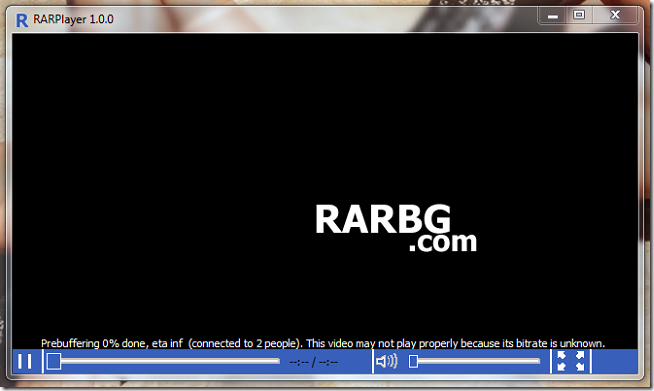
View torrent video before downloading them completely


rarbg-playerEveryone know we need to download the whole file from torrents before we can view it. Some torrents do have sample videos with them and user can download them first and see if this quality will suffice to their needs of watching the video but most of the times, the torrent doesn’t have any sample video files which means one need to download the full length video and then view it, may be only to find out that the video’s quality is not even watchable or its something that is not worth watching
at this quality.

Disable User or Computer Settings in Local Group Policy


Applies To: Windows 7, Windows Server 2008 R2
Occasionally you may want to disable policy settings rather than delete the entire Local Group Policy.
To disable user or computer policy settings in a Local Group Policy object
  1. Open Microsoft Management Console.
  2. Click File and then click Add/Remove Snap-in.
  3. In the Add/Remove Snap-in dialog box, in the Available Snap-ins list box, click Group Policy Object Editor, and then click
    Add.
  4. In the Select Group Policy Object dialog box, click Browse.
  5. To specify Local Computer Policy, click OK and then clickFinish. Proceed to Step 7.
  6. To specify Local Computer Policy for users or groups, click the Users tab, and select from the following Local Group Policy objects:
    • Administrators: Predefined Local Group Policy that applies to users included in the Administrators group.
    • Non-Administrators: Predefined Local Group Policy that applies to users not included in the Administrators group.
    • User-Specific: Local Group Policy objects associated with a specific local user account.
  7. Right-click the name of the Local Group Policy object, and then click Properties.
  8. Click Disable Computer Configuration settings or Disable User Configuration settings.
  9. Click OK, and then close Microsoft Management Console.
Additional considerations
  • Local Computer Policy allows you to disable both computer and user configurations. Administrators, Non-Administrators, and User-Specific Local Group Policies allow you to disable only the user configuration. 
  • Local Group Policy Editor and the Resultant Set of Policy snap-in are available in Windows Server 2008 R2 and Windows 7 Professional, Windows 7 Ultimate, and Windows 7 Enterprise. For more information, seehttp://go.microsoft.com/fwlink/?LinkId=139815.

Tips for those who wants to learn hacking


Many people on net impressed by the word “hacking” might do a little search on google about learning hacking. No doubt, they are at the right place. I would have rather use words – they are on the right track but will they open up the right door and gain something or they will just end up becoming a victim them self.

First of all, there is a difference between hacking and cracking. In layman language all hacking, keygens, cracks, gaining unauthorized access is refered as hacking and th
e word hacking is marked with a tag which is illegal to do. But it is not the way it is supposed by a large audience. Hacking is defined as unauthorized use, or attempts to circumvent or bypass the security mechanisms of an information system or network. Click here for more definitions. Cracking is equivalent to hacking when it is done by bad intentions and not for security improvement and educational purposes.
A common man would try to hack accounts on yahoo, hotmail, gmail, orkut etc. For this a little search will do but in most of the case you will end up loosing your own details without a slightest hint. I remember searching for tools to hack yahoo, gmail etc and found out some tools which require you to login before they can serve any purpose or in the worst scenario just execute their tool which could do anything from getting someone’s password to installing a trojan on your system to spy on you. Trojan serve as a backdoor entry for the hacker to gain access your system and then use up the computing power you possess.
So if you really want to get through all this, I mean if you dare to, then just take care of the fact that the tool you are going to use to hack someone might be used by the hacker to hack you.